Installing Whonix
We have already talked about the incredible anonymity that every Whonix user receives. Even if you are not Edward Snowden and the Pentagon is not chasing you, you can simply install and configure Whonix, and use it when you feel the breath of Uncle Sam on your neck.
It's not difficult and won't take much time, and knowing how to use Whonix gives you +100% anonymity. But first, you need to understand what virtual machines are and set up VirtualBox; if you haven't read these materials, you'll have to start from the basics.
Downloading Whonix
First, let's download Whonix. The peculiarity of Whonix is that it does not come as an installation file used to install an operating system in a virtual machine, but as an image of a fully configured virtual machine with the operating system already installed.
And we have two such images: one is Whonix-Workstation, the other is Whonix-Gateway.
Installing Whonix
Installing Whonix on different operating systems is not particularly different, mainly because the VirtualBox software is similar across all platforms. I will demonstrate using Windows as an example, but macOS and Linux users will have no problem installing Whonix following my screenshots.
The installation of Whonix occurs in two stages: installing Whonix-Gateway and installing Whonix-Workstation. To be precise, this is not an installation, but an import of configurations.
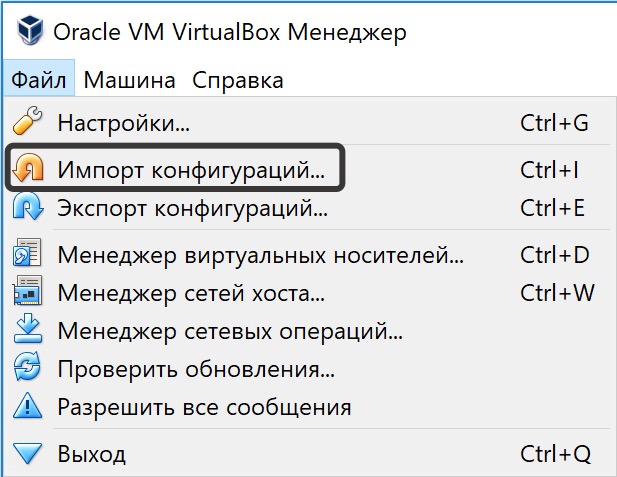
So, you have VirtualBox installed, and you have downloaded Whonix-Gateway and Whonix-Workstation, now you need to launch VirtualBox and select the option "File" > "Import Configurations".
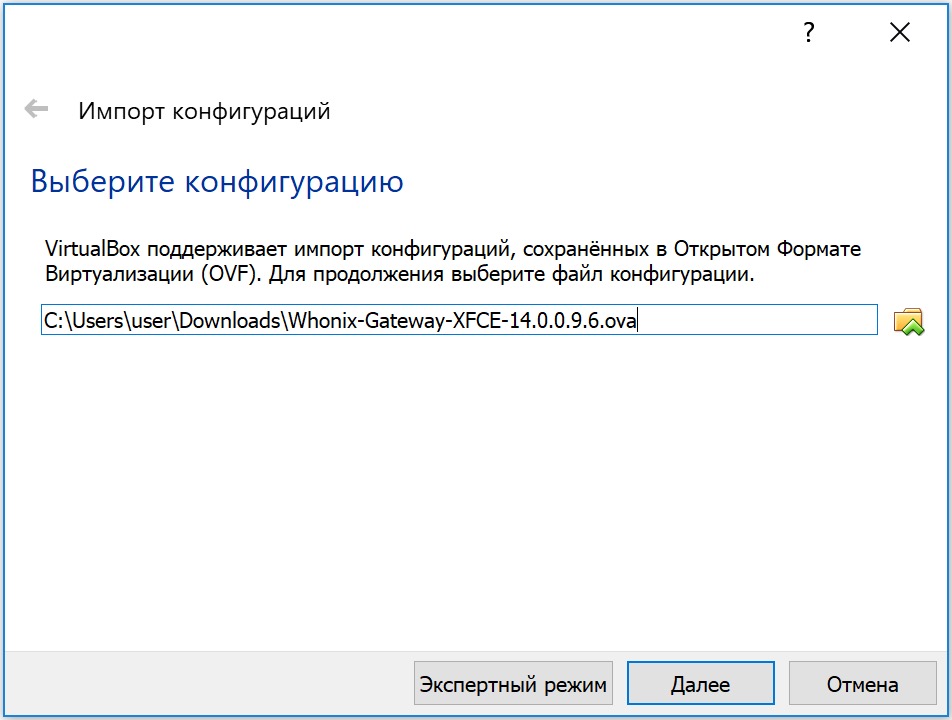
Next, specify the path to the previously downloaded Whonix-Gateway.
Since the image we downloaded is already a ready virtual machine with the operating system installed, all the parameters of the virtual machine (allocated RAM, disk size, etc.) are already set, and the program will only inform you of the amount of allocated resources.